
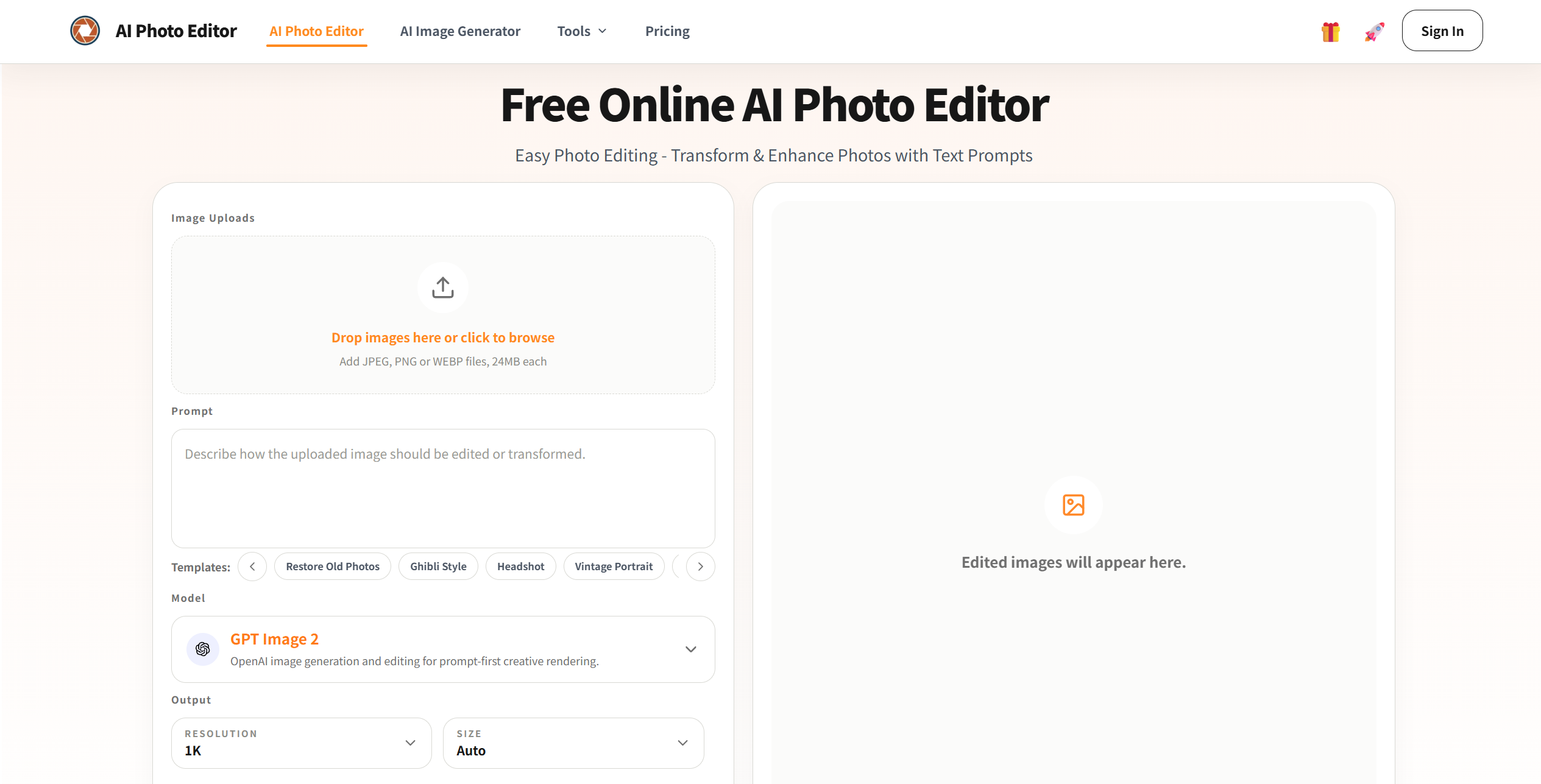
What is AI Photo Editor?
AI Photo Editor is an intelligent image-editing platform that leverages artificial intelligence to simplify photo enhancement, manipulation, and creative transformations. Its primary purpose is to allow users to edit and improve photos effortlessly, whether for personal use, social media, marketing, or professional projects. The platform combines advanced AI algorithms with a user-friendly interface, enabling anyone—regardless of technical skill—to enhance image quality, apply artistic effects, remove unwanted elements, and completely transform visuals in minutes.
By automating complex editing tasks, AI Photo Editor empowers users to focus on creativity rather than technical constraints, making high-quality image editing fast, accessible, and fun.
AI Photo Editor’s Core Function
- Automatic Image Enhancement
- Instantly improves photo quality by adjusting brightness, contrast, saturation, and sharpness with AI optimization.
- Background Removal & Replacement
- Remove unwanted backgrounds or replace them with custom or pre-set environments seamlessly.
- AI-Powered Retouching
- Smooth skin, remove blemishes, adjust facial features, and enhance portraits professionally.
- Artistic Filters & Styles
- Transform images using AI-generated artistic effects such as sketches, paintings, vintage, cinematic, or fantasy styles.
- Object Removal & Editing
- Remove unwanted objects, distractions, or imperfections from images without affecting surrounding areas.
- Color Correction & Adjustment
- Fine-tune colors, shadows, highlights, and tones to achieve precise visual aesthetics.
- Image Upscaling & Restoration
- Increase resolution, restore old or low-quality photos, and improve clarity using AI-driven enhancement.
- Text and Overlay Integration
- Add text, logos, or graphics and align them naturally with the image composition.
- Batch Editing
- Apply enhancements and filters to multiple images simultaneously for faster workflows.
- Export & Share
- Download edited images in multiple formats and resolutions suitable for print, web, or social media sharing.
How to Use AI Photo Editor
Step 1: Sign Up or Log In
Create an account to access full editing tools, save projects, and manage your images.
Step 2: Upload an Image
Choose a photo from your device or cloud storage to begin editing.
Step 3: Choose Editing Mode
Select the type of editing you want, such as enhancement, background removal, retouching, or artistic transformation.
Step 4: Apply AI Enhancements
Use one-click AI adjustments or customize settings manually for brightness, color, sharpness, and overall quality.
Step 5: Transform or Retouch
Apply filters, change backgrounds, remove objects, or retouch portraits to achieve your desired look.
Step 6: Customize Further
Add text, overlays, or effects, and fine-tune details for professional results.
Step 7: Preview and Compare
View before-and-after versions to ensure the edit meets your expectations.
Step 8: Export and Share
Download the final image or share it directly to social media, websites, or collaborative projects.
AI Photo Editor’s Use Case
Social Media Content Creation
Influencers and creators can produce high-quality, visually appealing images for Instagram, TikTok, Facebook, and other platforms.
Professional Photography
Photographers can enhance portraits, landscapes, and product photos with minimal manual effort.
Marketing and Advertising
Businesses can create promotional materials, product images, and advertisements that look polished and professional.
Personal Projects
Users can enhance vacation photos, family portraits, or personal creative projects.
E-commerce
Online sellers can edit product images to meet marketplace standards, improve presentation, and attract buyers.
Restoration of Old Photos
Revive old or damaged photographs with AI-powered restoration and upscaling.
Creative Art and Illustration
Artists can experiment with styles, effects, and transformations to produce unique visual art.
Educational and Tutorial Use
Teachers and students can enhance visual materials for presentations, reports, or creative assignments.
Team Collaboration
Teams can collaboratively edit, enhance, and review images for projects or campaigns.
Content Monetization
Content creators can produce professional-grade images for blogs, websites, and commercial use.
The Benefit of AI Photo Editor
- Instant Professional Results
- Achieve high-quality edits quickly without mastering complex software.
- Creative Freedom
- Experiment with styles, backgrounds, and effects to create unique visuals.
- User-Friendly Interface
- Simple and intuitive controls make advanced editing accessible to everyone.
- Time-Saving Automation
- One-click enhancements reduce hours of manual photo editing work.
- Enhances Original Images
- Improve resolution, clarity, and colors without sacrificing quality.
- Removes Imperfections Easily
- Remove unwanted objects, blemishes, or distractions with minimal effort.
- Supports Multiple Projects
- Batch editing allows users to efficiently handle large sets of images.
- Accessible Anywhere
- Edit images on any device with a web browser, eliminating software installation needs.
- Boosts Social Media Engagement
- Polished images attract attention and improve the visual impact of content.
- Professional & Personal Use
- Suitable for marketing, e-commerce, photography, personal projects, and creative experimentation.
- Enhances Learning and Creativity
- Encourages users to explore artistic styles and improve visual storytelling skills.
- Seamless Sharing
- Easily export and distribute images to clients, audiences, or collaborators.