What is AI Image Translator?
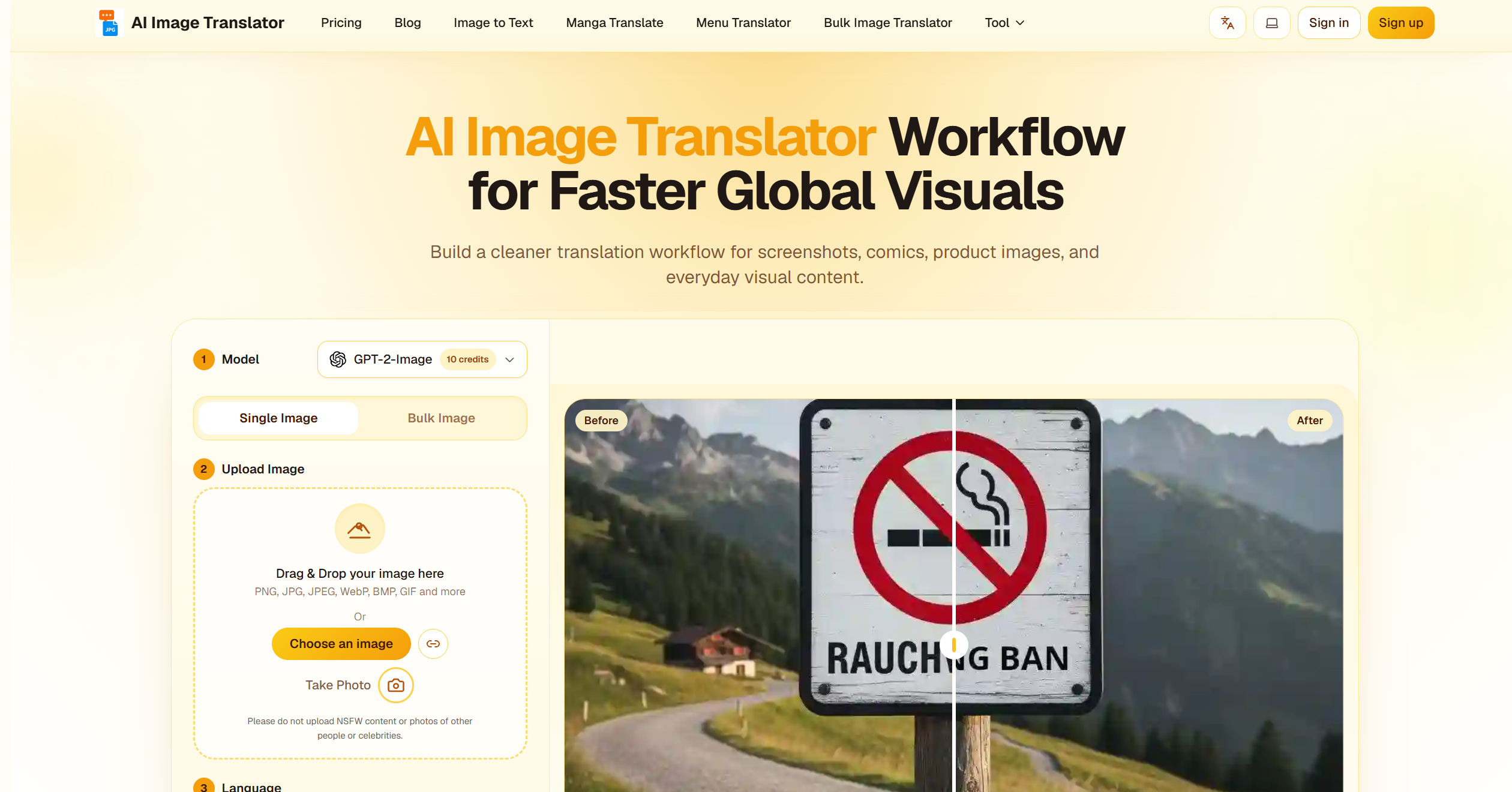
AI Image Translator is an intelligent image-processing platform that helps users translate text embedded within images into different languages. Its primary purpose is to remove language barriers by automatically detecting, extracting, translating, and replacing text from images while preserving the original visual layout as naturally as possible. Whether you’re translating comics, screenshots, posters, product labels, documents, infographics, menus, or social media images, AI Image Translator streamlines the entire process with the help of artificial intelligence.
Instead of manually typing text into a translation tool, users can simply upload an image and let the platform handle text recognition and translation automatically. This makes multilingual content more accessible, saving both time and effort for individuals, students, travelers, content creators, and businesses.
AI Image Translator’s Core Function
- Image Text Recognition (OCR)
- Automatically detects and extracts text from uploaded images, including screenshots, photos, scanned documents, and graphics.
- Multi-Language Translation
- Translates detected text into multiple target languages, making content understandable across different regions.
- Automatic Text Replacement
- Replaces original text with translated content while maintaining the image’s visual appearance and structure.
- Layout Preservation
- Attempts to preserve fonts, alignment, spacing, and formatting to keep translated images looking natural.
- Batch Processing
- Supports translating multiple images in a single workflow, increasing productivity for larger projects.
- Document Image Translation
- Handles image-based documents such as flyers, manuals, reports, and educational materials.
- Comic and Manga Translation
- Identifies dialogue and captions in comics and visual storytelling content for easier localization.
- Screenshot Translation
- Quickly translates application screenshots, game interfaces, and website captures.
- Preview and Editing Tools
- Allows users to review translations and make adjustments before exporting the final image.
- Export and Download
- Saves translated images in common formats for sharing, publishing, or archiving.
How to Use AI Image Translator
Step 1: Upload an Image
Choose an image from your device. This could be a photo, screenshot, scanned document, poster, comic page, or any image containing text.
Step 2: Select the Source Language
Allow the platform to automatically detect the language or manually choose the original language for better accuracy.
Step 3: Choose a Target Language
Select the language into which you want the image content translated.
Step 4: Start Translation
Click the translation button and let the AI analyze the image, extract text, and generate translations.
Step 5: Review the Results
Examine the translated text and visual placement to ensure everything appears correct and readable.
Step 6: Make Adjustments
If necessary, edit specific words, phrases, or formatting elements to improve clarity.
Step 7: Generate the Final Version
Apply the finalized translation to the image while preserving the overall design.
Step 8: Download or Share
Export the translated image and use it for personal, educational, professional, or commercial purposes.
AI Image Translator’s Use Case
Travel Assistance
Travelers can translate street signs, restaurant menus, transportation information, and public notices while visiting foreign countries.
Educational Learning
Students can translate learning materials, research graphics, diagrams, and educational documents from different languages.
Manga and Comic Localization
Readers can understand foreign-language comics, manga, and graphic novels without needing separate text translations.
Social Media Content
Users can translate viral images, memes, infographics, and social media posts from around the world.
Business Communication
Companies can localize marketing materials, advertisements, presentations, and promotional graphics for international audiences.
E-Commerce Expansion
Online sellers can translate product images, packaging labels, and instruction graphics to reach global customers.
Document Translation
Professionals can convert image-based reports, brochures, manuals, and scanned documents into other languages.
Gaming Community Support
Players can translate screenshots, game interfaces, tutorials, and in-game instructions from international gaming communities.
Research and Information Gathering
Researchers can access visual information from foreign-language sources without manually retyping text.
Content Creation
Creators can adapt visual content for multilingual audiences and expand their reach across different markets.
The Benefit of AI Image Translator
- Breaks Language Barriers
- Makes visual content accessible regardless of the language it was originally created in.
- Saves Significant Time
- Eliminates the need to manually copy and paste text into separate translation tools.
- Simple and Beginner-Friendly
- Anyone can translate image content with just a few clicks.
- Supports Global Communication
- Enables users to interact with information from different cultures and regions.
- Preserves Visual Design
- Maintains the look and feel of the original image while replacing text with translated content.
- Improves Productivity
- Speeds up workflows for students, businesses, researchers, and content creators.
- Enhances Learning
- Helps users explore foreign-language materials and expand language knowledge.
- Useful Across Multiple Industries
- Applicable to education, travel, marketing, publishing, e-commerce, and entertainment.
- Handles Diverse Content Types
- Works with screenshots, documents, posters, comics, advertisements, and more.
- Reduces Manual Effort
- Automates text detection, translation, and image editing in a single workflow.
- Scalable for Large Projects
- Batch-processing capabilities allow efficient handling of multiple images.
- Creates New Opportunities
- Helps businesses and creators expand into international markets through localized visual content.